
Example-Analysis
Morefi
03 October 2026
Example-Analysis.RmdShield: 
Morefi © 2024 by Hugo Aguirre Villaseñor is licensed under a Creative Commons Attribution 4.0 International License.

Morefi: Example Analysis
This a methodological package developed in R. It includes functions that support data analysis and ensure reproducibility of the results reported in the article by Aguirre-Villaseñor et al. (2025).
In fisheries monitoring, body length is the most commonly measured parameter because it is quick and easy to obtain. In contrast, measuring weight requires a level and stable scale, which can be difficult to secure in field sampling. Biometric relationships are crucial in fisheries biology. When accurately calculated, these relationships can be very useful for management purposes, especially for estimating an organism’s total length or weight based on other body measurements.
Many species are marketed through artisanal fishing in various commercial forms. However, there are currently no biometric relationships that allow for predicting live weight (the total weight of the fish) from the different categories of landed weight, such as fillet weight, gutted weight, or frozen weight.
The objective of this package is to provide quantitative analysis for various morphological relationships that help predict: a) the expected live weight of different landed weight categories, b) the expected fillet yield from various commercial presentations, and c) testing the suitability of fillet yield as a reference point in managing the target species.
For this purpose, some functions and a vignette were created to explain the process step by step. Its implementation streamlines the methodology and enhances the clarity and impact of both the results and graphical presentations (tables and figures are personalized).
The functions included in the Morefi package enable the evaluation of length-length, weight-weight and length-weight biometric relationships using data that exhibit high variability and do not meet the assumptions necessary for adjustment via least squares. Given this variability, a robust regression method is employed for analysis. The “robustbase” package (version 0.99-2) was utilized to fit robust regression models, using the functions lmrob() for linear and nlrob() for non-linear regression (Maechler et al., 2024).
Installation
You can install the development version of Morefi from GitHub using one of the following options:
Using the pak package
# install.packages("pak")
pak::pak("Macrurido/Morefi")
or using the devtools package
Data available in the package
The package contains two data sets. Data are available under the terms of the The Creative Commons Attribution 4.0 International (CC BY 4.0).
Bullseye puffer measures
To demonstrate how the package functions, we utilize the dataset
botete, containing 1,397 fish across 7 variables: the total
length(LT), standard length (SL), body trunk length (LB), total weight
(WT), body trunk weight (WB), fillet weight (Wfi) and Fleet of the
bullseye puffer (Sphoeroides annulatus), collected from the
Eastern Central Pacific. In this dataset, the landing category is
included in the “Fleet” variable, which is categorized as follows: 1
indicates Fresh, while 2 denotes Frozen-thawed. This biometric data
file, is included in the package with permission from the Instituto
Mexicano de Investigación en Pesca y Acuacultura Sustentables (Mexican
Institute for Research in Sustainable Fishing and Aquaculture).
To access the data file, the data frame is stored in an object, such as ‘mydata’.
mydata <- Morefi::Botete
str(mydata)
#> 'data.frame':    1397 obs. of  7 variables:
#>  $ LT   : num  21 22 12 21 12 28.4 29.3 34.8 31.7 31.5 ...
#>  $ LS   : num  17.3 17.6 10 17.3 10 23 24.2 27.5 25.5 26 ...
#>  $ LB   : num  17 15 10 15 8.5 20 20.5 27 23 24 ...
#>  $ WT   : num  189.1 213.4 33.4 236.7 36 ...
#>  $ WB   : num  115.6 86.7 15.4 100.4 18.9 ...
#>  $ Wfi  : num  50.7 55.5 6.9 65 9.1 ...
#>  $ Fleet: Factor w/ 2 levels "1","2": 2 2 2 1 2 1 2 1 1 1 ...
Bullseye puffer fish landings
A second dataset Botete_land, provided the Mexican
fishing records of bullseye puffer landed on the Pacific coast in 2023
and their live weight corresponding live weight for each weight category
(kg): total (WT), body trunk (WB) or fillet (Wfi), either Fresh or
Frozen-thawed (SIPESCA, 2024).
To access the data file, the data frame is stored in
catch.
catch <- Morefi::Botete_land
catch
#>          Category  Landed   Biomass    Pesos  Pesos_kg
#> 1        WT_Fresh  509354  509354.0  33079.5  41.49873
#> 2        WB_Fresh  449646  494610.6  58048.0  52.05232
#> 3 WB_Fresh_Thawed  361404  451755.0  37997.0  54.77369
#> 4       Wfi_Fresh   47990   95980.0  16485.0 112.83715
#> 5           Total 1368394 1551699.6 145609.5  50.97446
theme_papers()
The theme_papers() is created to standardize the graphic
format, used as base theme_bw(). To showcase their design,
this manual presents graphics in both their original format and the
format created using the theme_papers().
To call the theme_papers() function use the following
statement:
theme_papers <- Morefi::theme_papers()Values to define for the examples
The following objects, data frames, and lists will be utilized in multiple examples to avoid repetition of information.
Morefi functions
The Morefi package includes functions that facilitate data analysis and ensure reproducibility of results. The functions for analysis are outlined below, followed by the functions for plotting.
Analysis functions
fn_ARSS()
The function fn_ARSS() perform the Coincident Curves
Test, to determine if there are significant differences between the
fitted curves for each database. It is based on the Analysis of the
Residual Sum of Squares (ARSS) (Chen et al. 1992).
of each regression fitted by pooled data, = sum of the of each regression fitted for each individual sample, = total sample size, and = number of samples in the comparison.
The residual sum of squares
and the degrees of freedom
for each fitted regression are previously stored in the
List_TCCT list. For each regression, the calculations are
stored in a data frame T1, which is stored iteratively
using a loop for in a list T.
Inside the function, the RSS and DF for the joined sample are calculated to perform the F test for two tails . The decision criteria is performed: “*” if or “NS” if the .
The function requires defining:
-
List_TCCT: A list with fitted regression results.
-
i: An integer value indicating the ith regression analyzed. -
alfa: A numerical value that defines the significance level. The default number is 0.05.
The function return a data frame containing the results of the Coincident Curves Test stored in a list.
Example
The Total length (LT) - Total weight (WT) was estimated for the bullseye puffer Sphoeroides annulatus for landed categories: Fresh, Frozen-thawed (Frozen), Total (All sample) and Joined (sum of values of Fresh and Frozen). The Residual Sum of Squares (RSS) and the degrees of freedom (DF) are provided for each data source. In the table the first row displays the Analysis of Residual Sum of Squares (ARSS), the p-value (p), and the decision criteria for the ARSS test (Criteria).
In the table the first row displays the Analysis of Residual Sum of Squares (ARSS), the p-value (p), and the decision criteria for the ARSS test (Criteria).
The adjusted models show the following data: Fresh SSR= and DF= 742;
Frozen SSR= 1280131.81 and DF= 651; and the total sample SSR= 6115874.53
and DF= 1395. Values are stored in the table Table_CC, this
is stored in a list, and the name of each item is built with the
acronyms of the model variables (e.g. LTWT).
Table_CC <- data.frame(matrix(NA,nrow=4,ncol=8))
Table_CC[1,1] <- "Lt-WT"
Table_CC[,2] <- c("Fresh","Frozen","Total","Joined")
colnames(Table_CC) <- c("Model","Category","RSS","DF","ARSS","F-table","p-value","Criteria")

Table_CC[1,3] <- 4424418.33
Table_CC[1,4] <-  742
Table_CC[2,3] <- 1280131.81
Table_CC[2,4] <-  651
Table_CC[3,3] <- 6115874.53
Table_CC[3,4] <-  1395

List_ARSS <- list(LTWT=Table_CC)

i <- 1

ARSS <- fn_ARSS(List_ARSS, i, alfa= 0.05)| Model | Category | RSS | DF | ARSS | F-table | p-value | Criteria |
|---|---|---|---|---|---|---|---|
| LT vs. WT | Fresh | 4424418 | 742 | 0.0721 | 1.0921 | 0.05007 | NS |
| NA | Frozen | 1280132 | 651 | NA | NA | NA | NA |
| NA | Total | 6115875 | 1395 | NA | NA | NA | NA |
| NA | Joined | 5704550 | 1393 | NA | NA | NA | NA |
ⓘ To enhance the visualization of the function results, tables and their headers were constructed using the knitr and kableExtra packages. The code is not displayed.
fn_dfa()
This function uses the augment() function from the
broom package to extract the observed values of the
independent variable (x) and dependent variable (y), along with the
weights (wi), fitted values (fitt), and residuals (ei) from the summary
of the fitted model. It then turns these components into tidy
tibbles.
The function augment() does not provide the weights
column for the lmrob() function. The function
fn_dfa() contains a conditional statement that includes
this variable in the output data frame of the linear adjustments.
In order to homogenizes the results, the columns names were renamed as “y”, “wi”,“x”,“fitt”,and “ei”.
An additional column has been included that codes errors using a
scale based on weighted values: unweighted (u), weighted (w), and
outliers (o)
dfa$scale <- ifelse(df$wi < 0.25, "o", ifelse(df$wi<1, "w", "u")).
The function requires defining:
-
eq: Summary of the equation fitted.
Example
Using the biometric data from Morefi::botete, a linear
relationship between Total Length and Standard Length (LT_LS) was
established using the robustbase::lmrob function.
Additionally, the relationship between Total Length and Total Weight
(LT_WT) was fitted using the robustbase::nlm function, with
an input y-value of a = 0.1 and a slope of b = 3.
For optimal functionality of fn_dfa(), the data frames
used for fitting relationships must be formatted as tibble.
library(dplyr)
library(tibble)

df <- dplyr::tibble(x1 = mydata[,1],
                y1 = mydata[,2])

eq1 <- robustbase::lmrob(y1 ~ x1, data= df,
                                  setting = "KS2014",
                                              doCov = TRUE)
dfa1 <- fn_dfa(eq= eq1)

#  Power Model
df <- dplyr::tibble(x1 = mydata[,1],
                y1 = mydata[,4])

a=0.01
b=3

eq2 <- robustbase::nlrob(y1 ~ a*x1^b, data= df,
                        start = list(a= a, b= b),
                        trace = FALSE)

dfa2 <- fn_dfa(eq= eq2)| y | x | fitt | ei | wi | scale |
|---|---|---|---|---|---|
| 17.3 | 21.0 | 17.174230 | 0.1257696 | 1.0000000 | u |
| 17.6 | 22.0 | 17.999109 | -0.3991088 | 0.9914912 | w |
| 10.0 | 12.0 | 9.750324 | 0.2496758 | 1.0000000 | u |
| 17.3 | 21.0 | 17.174230 | 0.1257696 | 1.0000000 | u |
| 10.0 | 12.0 | 9.750324 | 0.2496758 | 1.0000000 | u |
| 23.0 | 28.4 | 23.278331 | -0.2783310 | 1.0000000 | u |
| y | wi | x | fitt | ei | scale |
|---|---|---|---|---|---|
| 189.1 | 1.0000000 | 21.0 | 209.81549 | -20.71549 | u |
| 213.4 | 1.0000000 | 22.0 | 242.19890 | -28.79890 | u |
| 33.4 | 1.0000000 | 12.0 | 37.32321 | -3.92321 | u |
| 236.7 | 1.0000000 | 21.0 | 209.81549 | 26.88451 | u |
| 36.0 | 1.0000000 | 12.0 | 37.32321 | -1.32321 | u |
| 457.0 | 0.5098231 | 28.4 | 532.50610 | -75.50610 | w |
ⓘ To enhance the visualization of the function results, tables and their headers were constructed using the knitr and kableExtra packages. The code is not displayed.
fn_freq()
It is used as an internal function within
fn_freqw().
The fn_freq() function calculates a frequency
distribution of data using the cut() and
table() functions from the R base. It produces a data frame
that displays frequencies categorized by class interval.
Within the function, the non-cumulative absolute frequency is
calculated for each user-defined class interval based on the
breaks object. The breaks object must be
defined outside the function by the user.
The attributes and examples of fn_freq() are detailed in
the documentation for the fn_freqw() function below.
fn_freqw()
The fn_freqw() calculate the percentage frequencies of
weights by model adjusted using the robust regression approach. The
function calculates the relative frequency distribution using the
function fn_freq() from Morefi package. It
returns a table with frequencies by class interval.
The breaks object must be defined. To incorporate the number of non-weighted values , a class interval “1” is added to the sequence inside the function.
The function requires defining:
-
dfA vector of data values. -
breaksA vector with class intervals. -
rightLogical, indicating if the intervals should be closed on the right (and open on the left) or vice versa.
See also Morefi::fn_freq;
cut() and table() from the R base package.
Example
The weighted values were obtained from the summary of linear and
power models fitted using robust regression and stored in
dfa1 and dfa2, which were generated with the
fn_dfa() example. In each data frame, the weighted values
are stored in the column labeled “wi.”
The function fn_freqw() calculates the frequency of
weighted values within a defined interval based on a weighted scale
classification: unweighted
,
weighted
,
and outliers
.
The weighted scale is stored in breaks.
breaks  <-  c(0,0.25,1,Inf) # Weighted scale

df <- dfa1$wi    # Data frame 1
freq1 <- fn_freqw(df, breaks, right=FALSE)

df <- dfa2$wi    # Data frame 2
freq2 <- fn_freqw(df, breaks, right=FALSE)

# Merging the two data sets (as example)
freqw <- as.data.frame(t(cbind(freq1, freq2)))| [0,0.25) | [0.25,1) | [1,Inf) | |
|---|---|---|---|
| freq1 | 1.216893 | 30.06442 | 68.71868 |
| freq2 | 3.364352 | 27.05798 | 69.57767 |
ⓘ To enhance the visualization of the function results, tables and their headers were constructed using the knitr and kableExtra packages. The code is not displayed.
fn_xseq()
The function creates a data frame containing a sequence for the selected independent variable based on the model. The lower end of the range is determined by rounding down the minimum value to the nearest multiple of the specified “bin” step size, while the upper end is determined by rounding up the maximum value.
The data frame should have the same column name as the dependent variable used in the fitted model.
The function requires defining:
-
dfA data frame includes the morphological variables. -
modelosA list defining the numerical column variables for the model. -
binA vector contains the step size for each independent variable in every model. -
iAn integer value indicating the regression to be analyzed.
The function returns a one-column data frame with the sequence selected.
Example
Using biometric data from Morefi::botete, the sequence
of independent variables for the relationships between Total Length and
Standard Length (LT_LS) and between Total Length and Total Weight
(LT_WT) was computed using the function fn_xseq.
The object modelos was defined earlier in the section
titled Values to Define for the Examples.
df <- mydata
bin <- c(2)
i=1
xseq1 <- fn_xseq(df, modelos, bin, i)

bin <- c(5)
i=2
xseq2 <- fn_xseq(df, modelos, bin, i)| 1 | 2 | 3 | 4 | 5 | 6 | 7 | 8 | 9 | |
|---|---|---|---|---|---|---|---|---|---|
| x1 | 8 | 10 | 12 | 14 | 16 | 18 | 20 | 22 | 24 |
| x1 | 5 | 10 | 15 | 20 | 25 | 30 | 35 | 40 | 45 |
ⓘ To enhance the visualization of the function results, tables and their headers were constructed using the knitr and kableExtra packages. The code is not displayed.
fn_intervals()
The function calculates a non-parametric confidence and predicted intervals using the function predFit() from the package investr (version 1.4.2).
The function requires defining:
-
xseqA vector with a sequence for independent variable. -
eqSummary of the equation fitted.
The function return a data frame df with the xseq (x1),
the fitted values for dependent variable (fit), the low and upper
confident (IC_L and IC_U) and predicted intervals (IP_L and IP_U).
Example
eq <- eq1
xseq <- xseq1
CI <- fn_intervals(eq,xseq)| x1 | fit | CI_L | CI_U | PI_L | PI_U |
|---|---|---|---|---|---|
| 8 | 6.450810 | 6.405704 | 6.495917 | 5.749724 | 7.151897 |
| 10 | 8.100567 | 8.060360 | 8.140774 | 7.399779 | 8.801355 |
| 12 | 9.750324 | 9.714849 | 9.785799 | 9.049791 | 10.450857 |
| 14 | 11.400081 | 11.369093 | 11.431069 | 10.699761 | 12.100401 |
| 16 | 13.049838 | 13.022970 | 13.076706 | 12.349688 | 13.749988 |
| 18 | 14.699595 | 14.676284 | 14.722906 | 13.999573 | 15.399617 |
ⓘ To enhance the visualization of the function results, tables and their headers were constructed using the knitr and kableExtra packages. The code is not displayed.
fn_fyield()
The function calculates the fillet yield by dividing a defined weight
reference point bm by the mean, lower, and upper confidence
interval of 95% (IC95%) of the estimated fillet weight, respectively.
These values are obtained from the list items
l_intervals$CI returned by the function
Morefi::fn_intervals().
If the analyzed regression has fillet weight as an independent variable, then values are calculated. An “if statement” is written for this propose.
Fillet yield was calculated for a sequence of the independent
variable (including minimum and maximum values). The function
fn_fyield() returms a table with fillet yield results.
The function requires defining:
-
iAn integer value that indicates which regression analysis to use. -
bmAn integer value used as a benchmark. -
dfA data frame with landed weights for each category.
Example
CI comes from fn_intervals() example
| x1 | fit | CI_L | CI_U | PI_L | PI_U | Yfit | YIC_L | YIC_U | YIP_L | YIP_U |
|---|---|---|---|---|---|---|---|---|---|---|
| 8 | 6.450810 | 6.405704 | 6.495917 | 5.749724 | 7.151897 | 2.7903471 | 2.8099957 | 2.7709715 | 3.1305851 | 2.5168149 |
| 10 | 8.100567 | 8.060360 | 8.140774 | 7.399779 | 8.801355 | 2.2220666 | 2.2331508 | 2.2110919 | 2.4325051 | 2.0451395 |
| 12 | 9.750324 | 9.714849 | 9.785799 | 9.049791 | 10.450857 | 1.8460925 | 1.8528338 | 1.8394001 | 1.9889961 | 1.7223468 |
| 14 | 11.400081 | 11.369093 | 11.431069 | 10.699761 | 12.100401 | 1.5789361 | 1.5832397 | 1.5746559 | 1.6822805 | 1.4875540 |
| 16 | 13.049838 | 13.022970 | 13.076706 | 12.349688 | 13.749988 | 1.3793275 | 1.3821732 | 1.3764934 | 1.4575266 | 1.3090921 |
| 18 | 14.699595 | 14.676284 | 14.722906 | 13.999573 | 15.399617 | 1.2245235 | 1.2264685 | 1.2225847 | 1.2857535 | 1.1688602 |
| 20 | 16.349352 | 16.328742 | 16.369962 | 15.649415 | 17.049289 | 1.1009611 | 1.1023507 | 1.0995749 | 1.1502028 | 1.0557625 |
| 22 | 17.999109 | 17.979977 | 18.018241 | 17.299214 | 18.699004 | 1.0000495 | 1.0011136 | 0.9989876 | 1.0405097 | 0.9626181 |
| 24 | 19.648866 | 19.629704 | 19.668028 | 18.948970 | 20.348762 | 0.9160834 | 0.9169777 | 0.9151909 | 0.9499197 | 0.8845747 |
| 26 | 21.298623 | 21.277930 | 21.319315 | 20.598683 | 21.998562 | 0.8451251 | 0.8459469 | 0.8443048 | 0.8738423 | 0.8182353 |
| x1 | fit | CI_L | CI_U | PI_L | PI_U | Yfit | YIC_L | YIC_U | YIP_L | YIP_U |
|---|---|---|---|---|---|---|---|---|---|---|
| 8 | 6.450810 | 6.405704 | 6.495917 | 5.749724 | 7.151897 | 2.7903471 | 2.8099957 | 2.7709715 | 3.1305851 | 2.5168149 |
| 10 | 8.100567 | 8.060360 | 8.140774 | 7.399779 | 8.801355 | 2.2220666 | 2.2331508 | 2.2110919 | 2.4325051 | 2.0451395 |
| 12 | 9.750324 | 9.714849 | 9.785799 | 9.049791 | 10.450857 | 1.8460925 | 1.8528338 | 1.8394001 | 1.9889961 | 1.7223468 |
| 14 | 11.400081 | 11.369093 | 11.431069 | 10.699761 | 12.100401 | 1.5789361 | 1.5832397 | 1.5746559 | 1.6822805 | 1.4875540 |
| 16 | 13.049838 | 13.022970 | 13.076706 | 12.349688 | 13.749988 | 1.3793275 | 1.3821732 | 1.3764934 | 1.4575266 | 1.3090921 |
| 18 | 14.699595 | 14.676284 | 14.722906 | 13.999573 | 15.399617 | 1.2245235 | 1.2264685 | 1.2225847 | 1.2857535 | 1.1688602 |
| 20 | 16.349352 | 16.328742 | 16.369962 | 15.649415 | 17.049289 | 1.1009611 | 1.1023507 | 1.0995749 | 1.1502028 | 1.0557625 |
| 22 | 17.999109 | 17.979977 | 18.018241 | 17.299214 | 18.699004 | 1.0000495 | 1.0011136 | 0.9989876 | 1.0405097 | 0.9626181 |
| 24 | 19.648866 | 19.629704 | 19.668028 | 18.948970 | 20.348762 | 0.9160834 | 0.9169777 | 0.9151909 | 0.9499197 | 0.8845747 |
| 26 | 21.298623 | 21.277930 | 21.319315 | 20.598683 | 21.998562 | 0.8451251 | 0.8459469 | 0.8443048 | 0.8738423 | 0.8182353 |
ⓘ To enhance the visualization of the function results, tables and their headers were constructed using the knitr and kableExtra packages. The code is not displayed.
fn_R2RV()
The function calculates a robust version of the coefficient of determination using the Equation Summary values fitted with the robustbase::nlrob() function.
This is the consistency corrected robust coefficient of determination by Renaud and Victoria-Feser (2010) which allows for a possible correction factor a for consistency considerations.
Inside the function:
The vectors of observed (y1), predicted (yc) and weighted (W) values are obtained from the summary model (eq).
The value of the Weighted Estimate Average (ywea), the modified sum of squares for explained (SSEw), total (SSTw), and residual (SSRw) were estimated.
The correction factor value for consistency considerations a for 95 percent was also obtained from summary model (eq).
A vector with the robust version of the coefficient of determination R2wa and its adjusted value R2wa_adj were returned as a vector.
In the function, the following were estimated:
The Weighted Estimate Average (called as ywea).
The modified sum of squares explained SSEw
In this function, the robust residual standard error was utilized, and the modified sum of squared residuals was computed .
The variables and (degrees of freedom) were obtained from the model summary.
The robust version of the coefficient of determination The adjusted coefficient of determination
where , and are the observed and predicted values, is the correction factor value for consistency considerations for 95 percent, the number of pairs of observations and the number of variables included in the model.
The function requires defining:
-
eqSummary of the equation fitted using robustbase::nlrob() function.
The function returns the a vector with the robust version of the coefficient of determination and its adjusted value .
fn_summary()
The function creates a customized table that displays the regression summary categorized by model and landed weight types: Fresh, Frozen-thawed (Frozen), and Total. The 95% confidence interval is noted in parentheses. Additionally, the adjusted coefficient of determination (R2) and the degrees of freedom (DF) are also reported.
The function requires defining:
-
List_TablesA list to store summary regression results. -
modelosA character vector containing the variables of a function. -
categoA character vector containing the landed weight categories. -
eqSummary of the equation fitted. -
R2A numeric value of the adjusted robust version of the coefficient of determination. -
iAn integer value indicating the ith regression analyzed. -
jAn integer value indicating the jth categorie analyzed.
Summary Regression Table.
To store the summary regression, a customised table T1
is generated. The type of function model (Linear or
Potential), and its variables, are indicated in the
first two columns. The third column indicates the data source used
(Fresh, Fresh-Thawed, or
Total). By row it is stored: the
Intercept, its confidence interval
(CI95%); the Slope; its
(CI95%); the adjusted robust coefficient of
determination R2,adj,w,a and the degrees of freedom
DF.
    # An empty table to store the summary regression results
catego <- c("Total")
nr <- length(catego)

T1 <- data.frame(matrix(NA, nrow = nr, ncol = 9))
names(T1) <- c("Function", "Model","Categories",
               "Intercept", "CI95%","Slope",
               "CI95%", "R2","DF")
T1
#>   Function Model Categories Intercept CI95% Slope CI95% R2 DF
#> 1 NA NA NA NA NA NA NA NA NAAqui
# Performing the table

#T_sum <- dplyr::bind_rows(List_Tables)

# Changing Model labels for the Table
# Insert three NA between values of vector row_name
#mdls <- as.vector(t(cbind(row_name, matrix(NA, nrow = length(row_name), ncol = 2))))
#T_sum$Model <- mdls
modelos <- modelos
catego <- c("Total")
j <- 1
i <- 1

# Linnear equation
eq <- eq1
# R squared
R2 <- summary(eq)$r.squared
#Non parametric IC 95 for parameters
#betas_IC95 <- confint(eq, level = 0.95)

List_Tables[[i]][j,] <- fn_summary(List_Tables, modelos, catego, eq, R2, i, j)
#>   Function        Model Categories  Intercept            CI95%     Slope
#> 1   Linear LT vs. vs.LS      Total -0.1482175 (-0.21 to -0.08) 0.8248785
#>            CI95%       R2   DF
#> 1 (0.82 to 0.83) 0.996128 1395
i <- 2

# Non nonlinear regression (Potential)
eq <- eq2
# R2 bobust version
R2 <- Morefi::fn_R2RV(eq)[2]
#> [1] 0.9805933 0.9805794
#IC 95 Non parametric for parameters
betas_IC95 <- confint(eq,method = "Wald")
List_Tables[[i]][j,] <- fn_summary(List_Tables, modelos, catego, eq, R2, i, j)
#>   Function        Model Categories  Intercept          CI95%    Slope
#> 1   Linear LT vs. vs.WT      Total 0.01747118 (0.02 to 0.02) 3.085355
#>            CI95%        R2   DF
#> 1 (3.06 to 3.11) 0.9805794 1395| Function | Model | Categories | Intercept | CI95% | Slope | CI95% | R2 | DF |
|---|---|---|---|---|---|---|---|---|
| Linear | LT vs. vs.LS | Total | -0.1482175 | (-0.21 to -0.08) | 0.8248785 | (0.82 to 0.83) | 0.996128 | 1395 |
ⓘ To enhance the visualization of the function results, tables and their headers were constructed using the knitr and kableExtra packages. The code is not displayed.
Aqui
fn_Wlive()
fn_Wlive(): The live weight, which is the total weight
of an organism, is estimated based on the weights of different landing
categories, such as eviscerated weight and fillet weight. These
estimates are derived using regression parameters that relate total
weight to the weight of each landing category.
Plot functions
To assist with analysis, three functions have been created to
generate a composite figure: fn_fig_e(),
fn_fig_fw(), and fn_fig_w(). The data points
in these figures are color-coded according to a weighted scale, and the
titles of each graph include subscripts. Each of these functions has
identical attributes, which are described below:
-
dfA data frame contains the following variables: independent (x) and dependent (y) variables, the fitted variable (fitt), a weighted variable (wi), and additional details including the weights (wi), fitted values (fitt), residuals (ei), and the scale.
The df is derived from the results of the
fn_dfa() function described earlier.
# Preparing the dataset.
library(dplyr)
tmp1 <- dfa1              # Data frame 1
tmp1['id'] = "LT_LS"      # to add an ID column to a Data frame

tmp2 <- dfa2              # Data frame 2
tmp2['id'] = "LT_WT"      # to add an ID column to a Data Frame

df <- rbind(tmp1, tmp2) # Joining data sets-
opacityA numeric value for the alpha aesthetic used to control the transparency of elements in a plot.
opacity <- 0.7-
tintA vector that specifies the palette colors used to color the points.
tint <- c("#000000", "#009E73", "#56B4E9")-
scaleA numeric vector that defines the thresholds for coloring the points.
The observed data points were coloured based on a weighted scale : blue for unweighted , green for weighted , and black for outliers . Lengths in cm and weights in g.
# weighted value scale
wi_scale <- c(0.000, 0.249, 0.990, 1.000)-
orderA vector determines the sequence of the plots.
# To order facet wrap plots in ggplot2
X_names <- c("LT_LS", "LT_WT")-
my_labellerTransforms objects to labeller functions. Used internally by labeller().
Since the parameters contain subscripts, the labels were customized
using the ggplot2::as_labeller() function and are stored in
my_labeller.
# The labels in the ggplot composite chart are customized to include subscripts.
library(ggplot2)
my_labeller <- as_labeller(c(LT_LS=  "L[T]-L[S]",
                             LT_WT=  "L[T]-W[T]"),
                           default = label_parsed)
fn_fig_e()
The function creates a graph that displays residuals on the vertical axis and either the independent variable or predicted values on the horizontal axis, as determined by the researcher.
Example
A residual analysis of the model fitting has been conducted using combined data sets for the pufferfish Sphoeroides annulatus. The label in the grey box indicates the variables used for each model; the first variable listed is the independent variable, and the second is the dependent variable. The x-axis represents the values of the independent variable, while the y-axis displays the raw residuals (ei).
The standard graphical output, along with the one customized using
the theme papers() function, is displayed.
# standard graphical output
p <- fn_fig_e(df, opacity, tint, scale= wi_scale,
              order= X_names, my_labeller)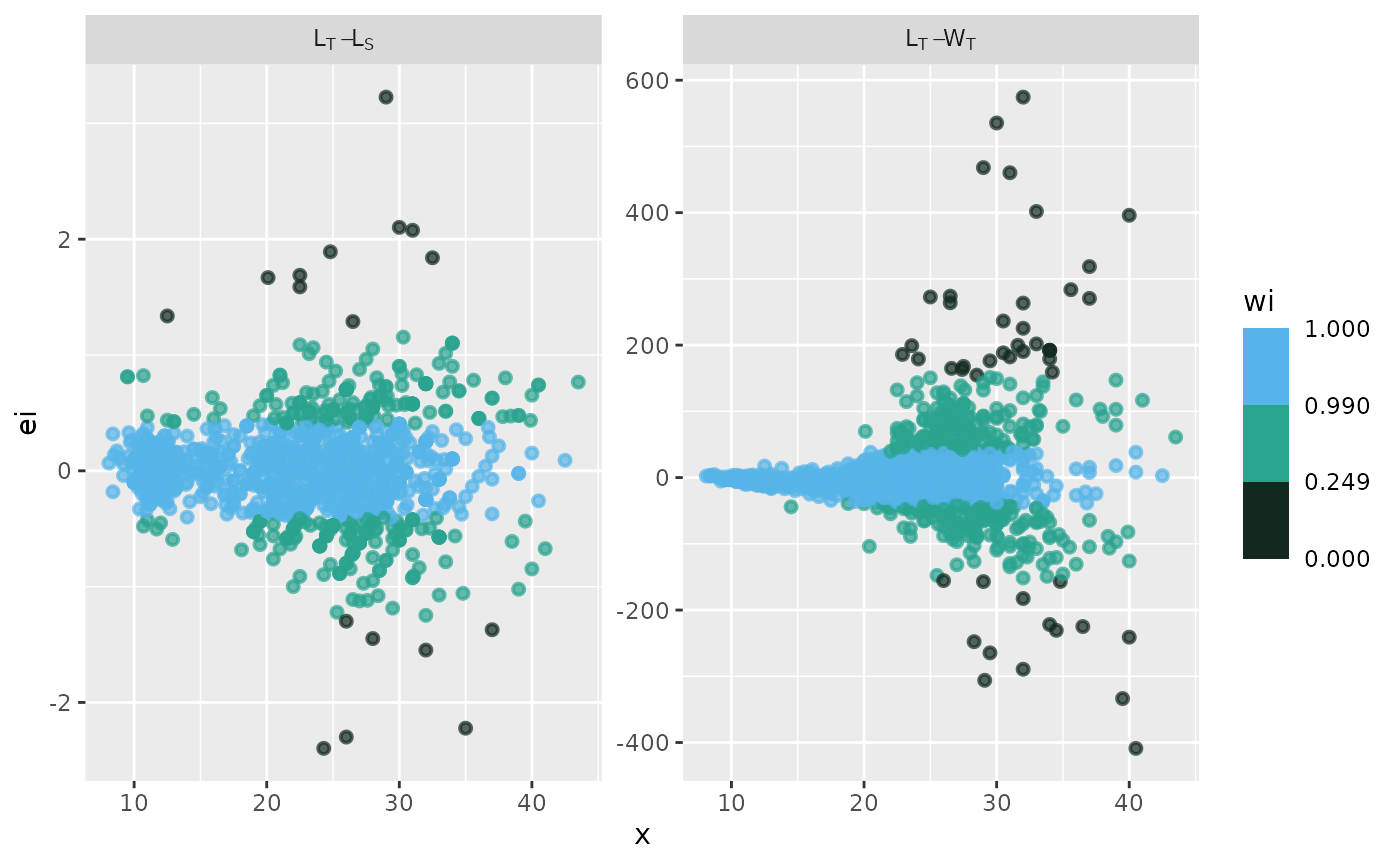
# theme papers()
p + theme_papers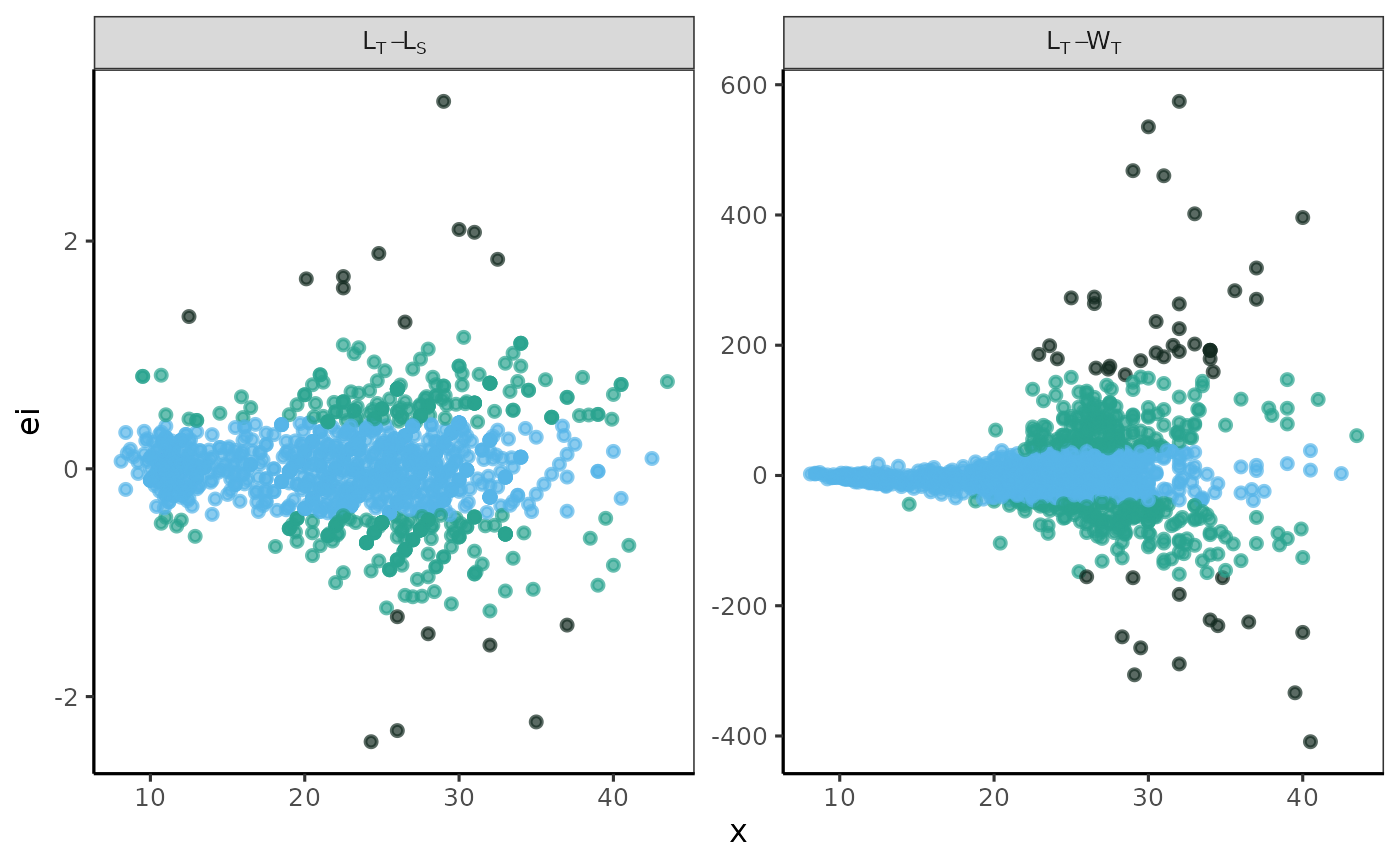
fn_fig_fw()
The fitted values of the models for a landed presentation category were displayed as a multi-panel plot. The observed data points for each fitted relationship were categorized according to a weighted color scale.
Example
Using the biometric data from Morefi::botete, a linear
relationship between Total Length and Standard Length (LT_LS) was
established using the robustbase::lmrob function.
Additionally, the relationship between Total Length and Total Weight
(LT_WT) was fitted using the robustbase::nlm function, with
an input y-value of a = 0.1 and a slope of b = 3.
The label in the grey box indicates the variables used for each model; the first variable listed is the independent variable, and the second is the dependent variable. The x-axis represents the values of the independent variable, while the y-axis displays the raw residuals (ei).
The standard graphical output, along with the one customized using
the theme papers() function, is displayed.
# standard graphical output
p <- fn_fig_fw(df, opacity, tint, scale= wi_scale,
               order= X_names, my_labeller)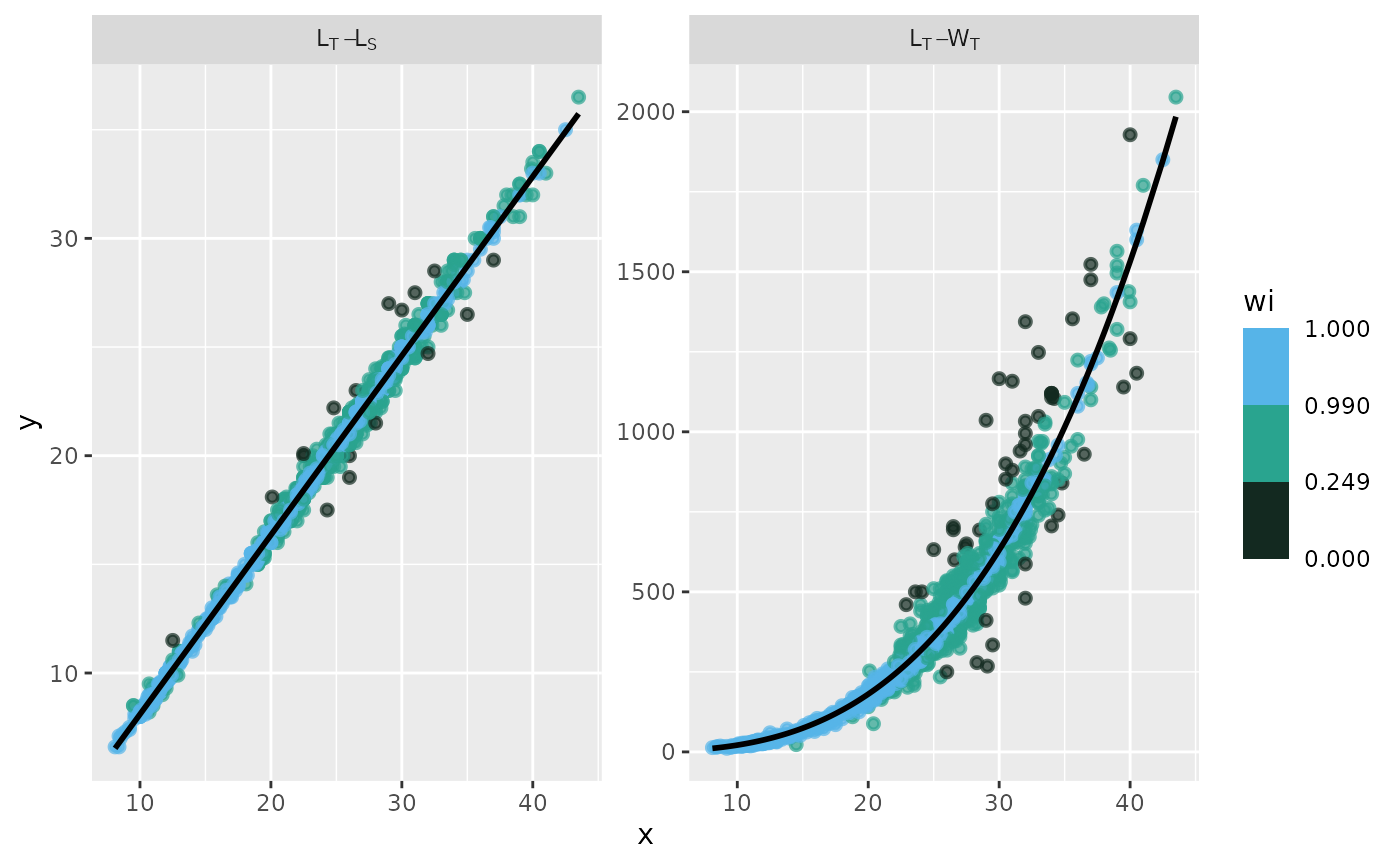
# theme papers()
p + theme_papers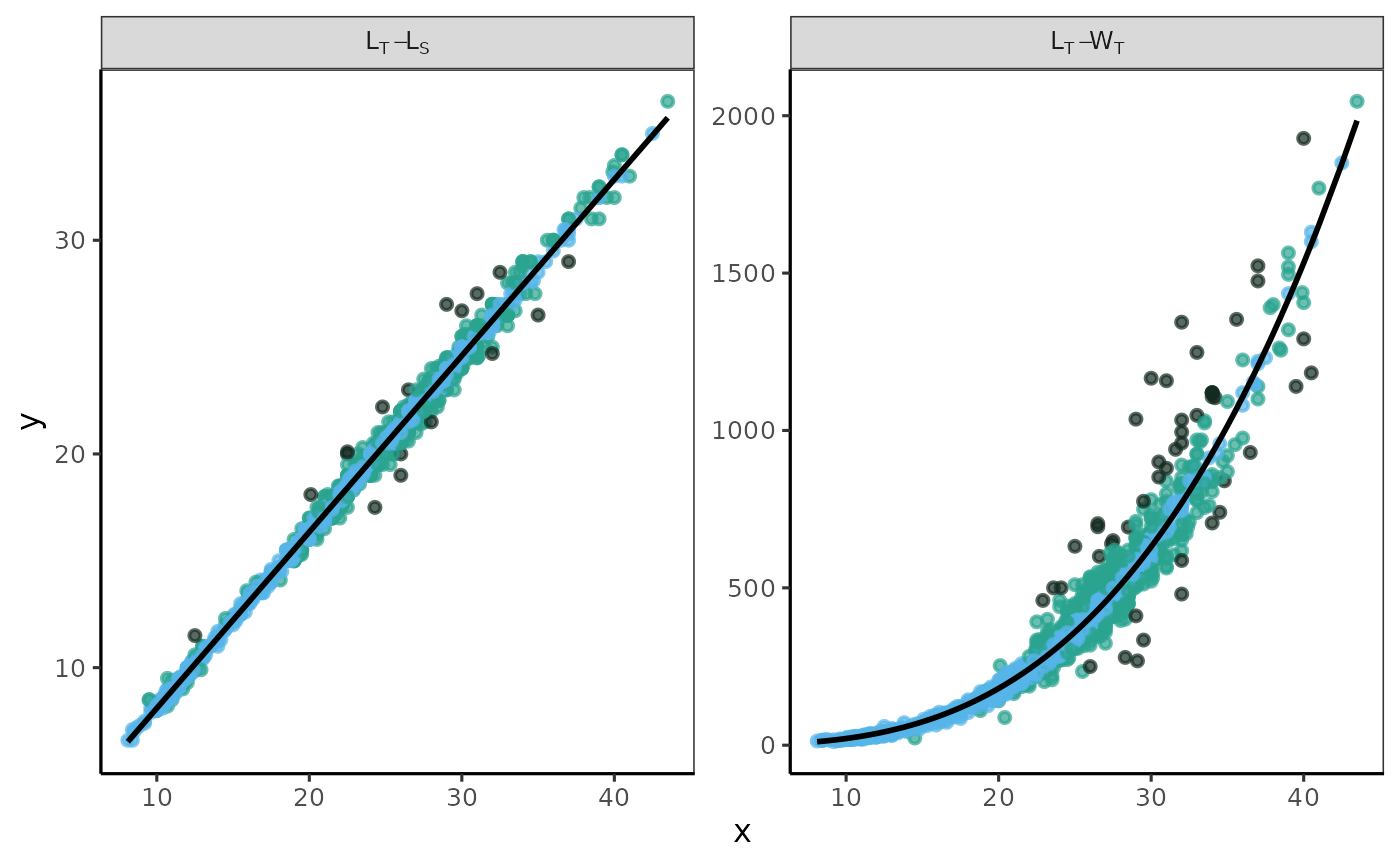
fn_fig_w()
The residual structure was analyzed by graphing residuals against weighted values. A custom multi-panel plot illustrates the structure of each fitted relationship, categorized by a color-weighted scale of values.
Example
The Residual Structures classified by a Weighted Scale was analyzed using combined data sets for the pufferfish Sphoeroides annulatus. The label in the grey box indicates the variables used for each model; the raw residuals are shown on the x-axis, and the weighted residuals (wi) are displayed on the y-axis.
The x-axis label is defined in the lab_x object, while the y-axis label is defined in the lab_y object. In this example, both labels are italicized, with the i-th label formatted as a subscript.
The standard graphical output, along with the one customized using
the theme papers() function, is displayed.
# standard graphical output
lab_x <- expression(italic(e[i]))
lab_y <- expression(italic(w[i]))

# Plot of Residual Structures Classified by a Weighted Scale.
p <- fn_fig_w(df, opacity,tint, my_labeller,order= X_names, lab_x, lab_y) 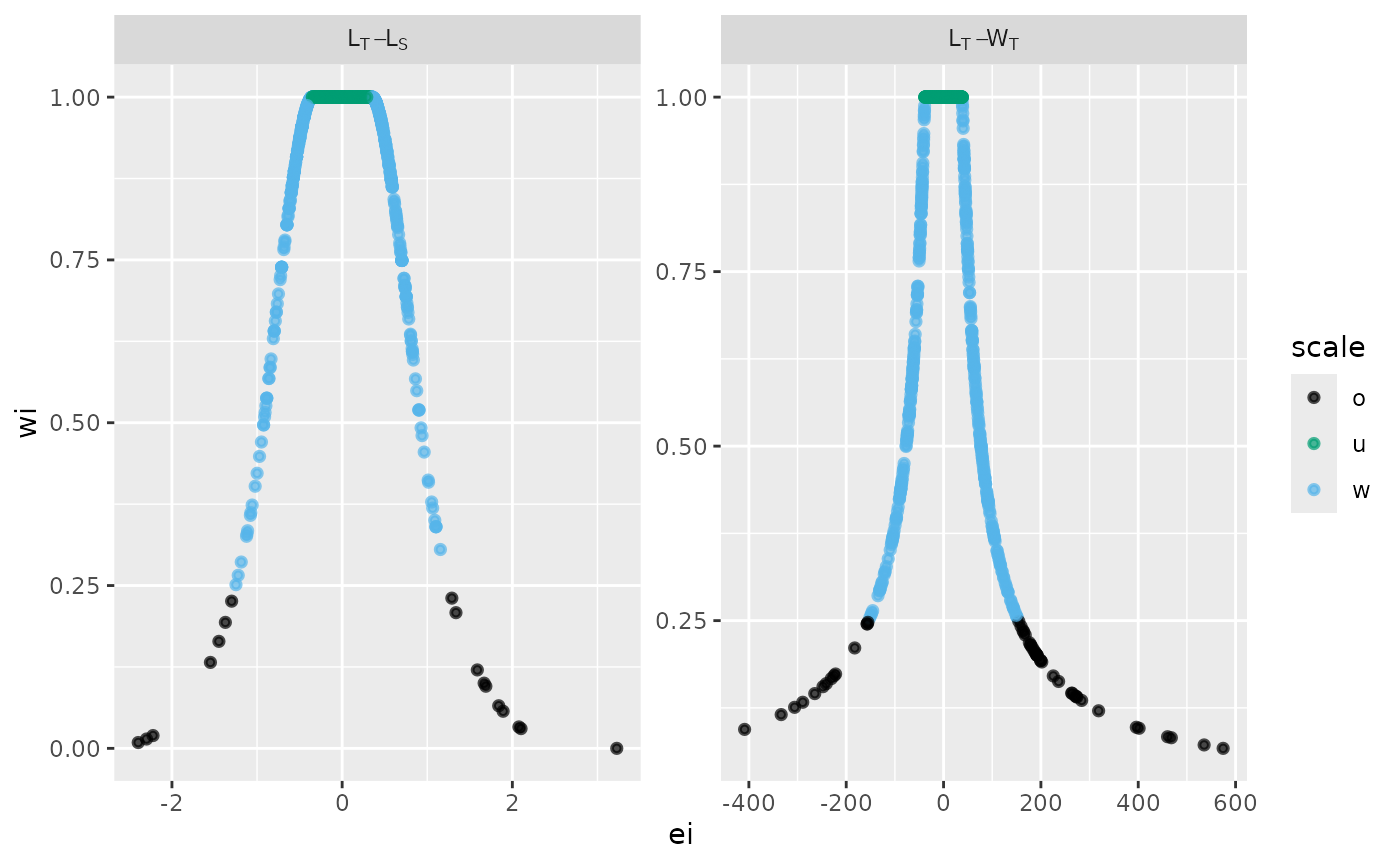
# theme papers()
p + theme_papers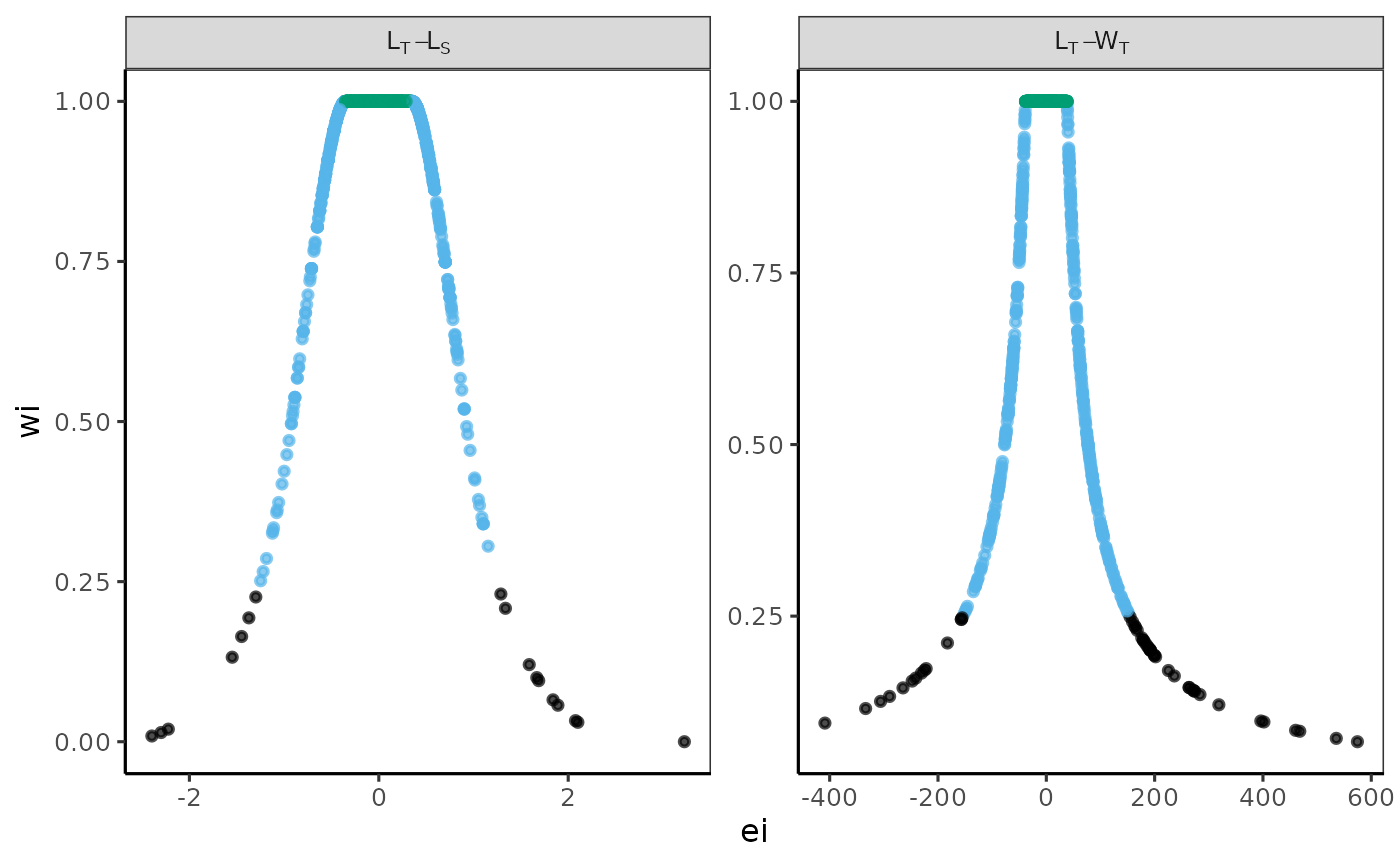
References
Aguirre-Villaseñor, H., Morales-Bojórquez, E., & Cisneros-Mata, M. Á. (2025). Biometric relationships as a fisheries management tool: A case study on the bullseye puffer (Sphoeroides annulatus) in an artisanal fishery. Fisheries Research, 292, 107593. DOI
Chen, Y., Jackson, D. A., Harvey, H. H. 1992. A comparison of von Bertalanffy and polynomial functions in modelling fish growth data. Canadian Journal of Fisheries and Aquatic Sciences 49(6): 1228–1235. DOI
Maechler M, Rousseeuw P, Croux C, Todorov V, Ruckstuhl A, Salibian-Barrera M, Verbeke T, Koller M, Conceicao EL, Anna di Palma M (2024). robustbase: Basic Robust Statistics. R package version 0.99-4-1, DOI
Renaud, O., Victoria-Feser, M. P. (2010). A robust coefficient of determination for regression. Journal of Statistical Planning and Inference. 140(7), 1852-1862. DOI
SIPESCA. 2024. Sistema de Información de Pesca y Acuacultura – SIPESCA. Comisión Nacional de Pesca y Acuacultura. SIPESCA
Citation
Aguirre-Villaseñor H (2024). Morefi: Morphological Relationships Fitted by Robust Regression. R package version 0.1.0, https://macrurido.github.io/Morefi/.
@Manual{,
  title = {Morefi: Morphological Relationships Fitted by Robust Regression},
  author = {Hugo Aguirre-Villaseñor},
  year = {2024},
  note = {R package version 0.1.0},
  url = {https://macrurido.github.io/Morefi/},
}
–> –>
–>